


AI Video&AI Kiss&AI Hug-VidyAI
4.464.00 Reviews
App Specs
- Version
- 1.9.0
- Updated On
- License
- Free
- Downloads
- 500,000+
- Developer
- AI faceswap video&AI video&AI music
- Categories
- Video Players & Editors
- Platform
- Android
Screenshots
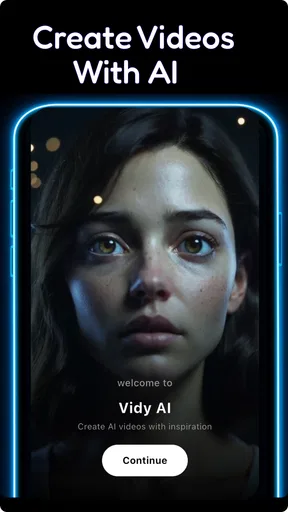
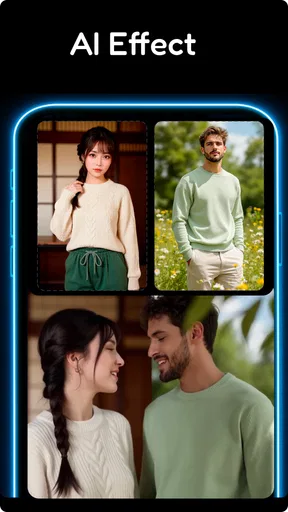
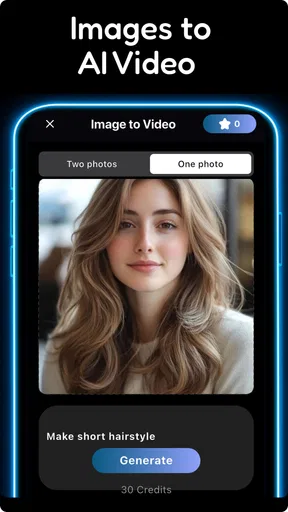
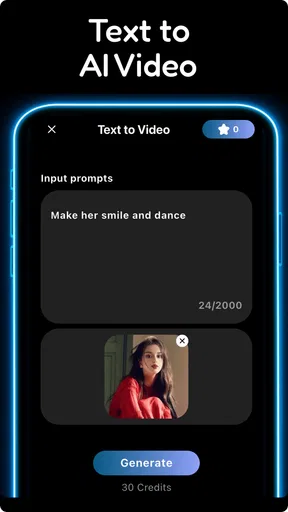
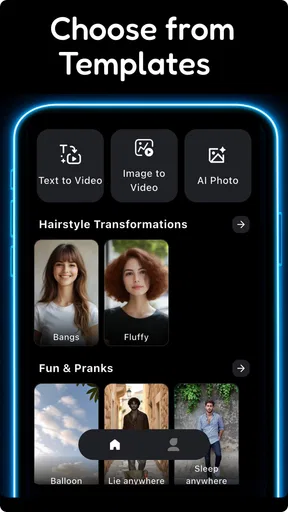
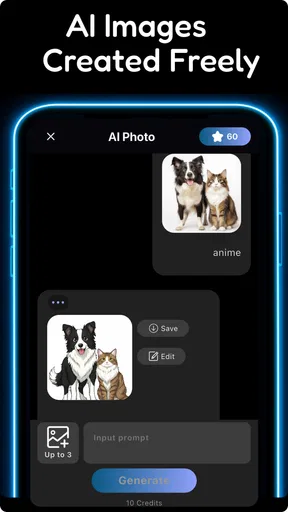
 Analysis by AppCompare
I’d approach this app as a quick creative studio for turning an image, a line of text, or an existing clip into something with a more imaginative feel. AI Video&AI Kiss&AI Hug-VidyAI is aimed at people who want to try AI-assisted video ideas without first learning a full editing program. That makes it appealing for casual posts, playful greetings, and visual experiments, though it is not a replacement for a precise, hands-on editor when every cut and detail matters.
A simple workflow works best
My practical starting point would be to choose one clear idea before opening the editor: a photo to animate, a short text prompt to shape into a scene, or a video that needs a playful treatment. The app is presented as a generator for image-based and text-based video, as well as AI images, so it suits users who want to begin with different kinds of material rather than only trim footage they have already shot.
For a first attempt, I’d keep the source image or prompt focused. A single subject and a straightforward action give the generation a clearer direction than a long description full of competing details. This is a useful habit with creative AI tools generally: make one change at a time, look at the result, and then adjust the idea. It is easier to understand what helped than when several choices are changed together.
Build a repeatable routine
A small amount of preparation can make casual creation less hit-or-miss. I’d keep a few original photos or prompt ideas ready, choose the one that fits the occasion, and avoid starting with an image that is already busy or hard to read. If the result is meant for a message or a social post, deciding on the mood first—sweet, silly, or dramatic—helps keep the finished clip from feeling like a collection of unrelated effects.
There is also a practical reason to save the original photo separately before experimenting: it gives you a clean fallback if an animated treatment does not suit the moment. For a greeting to a friend, for example, I might try a lighthearted AI effect on a copy rather than making the only version of the image the experimental one. That simple workflow protects the original and makes it easier to compare the plain image with the generated result.
Check the purchase model before settling in
The app is free to install, but it includes in-app purchases ranging from $5.99 to $199.99 per item. I would treat that range as a reason to explore cautiously rather than assume every creative option is included at no cost. Before building a regular workflow around it, check the price shown for any item you are about to use and decide whether that particular result is worth paying for.
That matters most if you plan to make several versions of the same idea. A one-off greeting and a repeated content routine are different use cases: the first may be easy to justify as an occasional experiment, while frequent creation makes the cost of individual purchases more important. I’d test the experience with a modest project first and avoid committing to a paid item until I know it fits how I actually create.
Worth Reading Before You Choose

Flipboard Shows What News Apps Must Do Beyond the Feed

Switching to Android Auto Means Rethinking Your Driving Routine

Google Calendar Makes a Crowded Week Easier to Manage

Ludo King Makes the Most of the Minutes Between Plans

Baby Panda World Brings Quick Play to Modern Phones, but Its Game Library Feels Busy

ESPN’s Live Game View Makes Following Close Games Easier
Features That Spark Joy
First off, AI Video&AI Kiss&AI Hug-VidyAI is packed with features that are both fun and surprisingly advanced. Imagine turning a simple video into a masterpiece with just a few taps. The AI-powered tools in this app do most of the heavy lifting, so you can focus on being creative without getting bogged down in technical details.
AI-Powered Editing
One of the coolest aspects is the AI editing feature. You can easily add effects that make your clips look like they were edited by a pro. Whether it’s adding a touch of color, enhancing lighting, or creating transitions that flow, the AI has got you covered. It’s perfect for those moments when you want to impress your friends or social media followers with minimal effort.
For me, the best way to judge an automatic edit is not by how elaborate it looks, but by whether it supports the idea of the clip. A generated effect can add charm quickly, yet it may also become the main event and distract from the person or message in the footage. I’d preview the result with the sound off and ask whether the visual still reads clearly; if the effect overwhelms the subject, a simpler treatment is probably the stronger choice.
Interactive Animations
Now, let’s talk about the interactive animations. The app allows you to add playful animations like kisses and hugs to your videos. It’s just plain fun and can add a whimsical touch to your content. Plus, the animations are customizable, so you can tweak them to suit your style or the mood of your video.
These effects are naturally best for people who already know the recipient will appreciate a bit of silliness. A short birthday greeting or a friendly reaction clip is a better fit than a serious announcement, where a playful animation could undercut the message. I’d also keep the clip focused on one reaction rather than piling on several, so the joke or affectionate gesture lands instead of becoming visual noise.
User-Friendly Interface
What’s great about VidyAI is that it’s super intuitive. The user interface is clean and easy to navigate, which makes the whole editing process a breeze. Even if you’re not tech-savvy, you’ll find it easy to create something awesome. The app guides you through each step, ensuring that you never feel lost or overwhelmed.
That approachable design is useful for a first experiment, but ease of use should not be confused with exact control. If your goal is to line up cuts precisely, balance several audio tracks, or make consistent adjustments across a longer project, a conventional timeline editor is usually the better tool. I see this app as a way to get a visual idea moving quickly, then use a more manual editor when the final piece needs careful finishing.
Know what kind of source suits it
The choice between starting from a picture, text, or a clip changes the kind of decision you need to make. With a photo, I’d prioritize a clear subject and an uncluttered frame. With text, I’d describe the central action in plain language rather than trying to dictate every visual detail. With existing footage, I’d first decide what should remain recognizable, so an AI treatment adds something without losing the point of the original.
This distinction is especially handy when a first result misses the mood. Instead of repeatedly rewriting everything, I’d identify whether the issue comes from the source, the prompt, or the effect itself. A confusing photo may need a different starting image; an overcomplicated prompt may need trimming; and an effect that simply feels wrong may be a reason to choose a conventional edit instead.
A World of Possibilities
With all these tools at your disposal, the possibilities are endless. Whether you’re creating content for a personal project, social media, or even professional purposes, VidyAI offers something for everyone.
Perfect for Social Media
If you’re an avid social media user, you’ll love how this app can enhance your stories and posts. The creative options allow you to stand out in the crowded digital space. Plus, the sharing options are seamless, so you can easily upload your creations to platforms like Instagram, TikTok, or Facebook.
A realistic everyday use would be turning a photo from a weekend get-together into a brief, affectionate greeting to send to the group chat. I’d start with a photo where faces and the main subject are easy to distinguish, choose one playful direction, and review the result before sharing. That takes less effort than building a polished montage, while still giving the message a personal touch. If I wanted a carefully branded post with exact framing and a consistent visual style, I would finish it in a more controlled editor instead.
Creativity Unleashed
For those who love experimenting, the app encourages creativity. You can mix and match different effects and animations to see what works best for you. It’s like a playground for your imagination, and the only limit is how far you’re willing to go.
Experimenting is most useful when each try answers a question. I might compare a still image with a text-led concept, or test whether a restrained effect communicates better than a more energetic one. Keeping the original source and changing only one creative choice at a time makes those comparisons meaningful. The trade-off is that exploration can take longer than expected, especially if you keep chasing a perfect result rather than choosing the version that already communicates the idea.
Community and Inspiration
The app also connects you with a community of creators. You can browse through other users’ creations for inspiration, or even share your own to get feedback. It’s a supportive environment that cultivates creativity and innovation.
When looking at other work, I’d use it as a source of broad ideas rather than a template to copy. The useful question is what makes a clip feel playful or expressive, then how that mood could fit my own image or message. That keeps the result personal and avoids spending time trying to reproduce a style that may not suit the material I have.
Who will get the most from it
I’d recommend this kind of tool to someone who enjoys making occasional, lighthearted visual content and wants a low-friction way to explore AI generation. It may also suit a social creator who needs quick variations for informal posts and is comfortable judging results by eye. The app is free to install, is rated for Everyone, and has a 4.5 average from around two thousand ratings, which gives a prospective user a useful sense of its broad reception without telling them whether its particular style will match their own taste.
I would steer away from it if your main need is dependable frame-by-frame editing, a professional production workflow, or predictable output for a client deadline. AI-generated visuals involve creative interpretation, so they are better approached as material to review than as a guaranteed final result. For those jobs, a standard editor with direct controls is less playful but gives you a clearer path to a specific finish.
Compatibility and version context
The app is listed as version 1.5.0 and requires Android 7.0 or later. It was released on December 3, 2025, and the developer is AI faceswap video&AI video&AI music. Those details are worth checking against your device before you plan a project, particularly if you are installing it on an older phone. Its audience rating is Everyone, but I’d still use ordinary judgment when choosing photos to animate or share, especially when other people appear in them.
As a video creation app, it sits between a standard editor and a fully manual creative suite. A conventional editor is often more dependable for trimming, sequencing, and precise finishing; a text-to-video specialist may be a better match if that single task is your whole workflow. This app’s appeal is the broader invitation to try AI images and video ideas in one place, with playful effects as part of the experience. That breadth is convenient for casual exploration, but it does not remove the need to inspect the result or decide whether another tool is better for a particular job.
Wrapping It Up
In conclusion, AI Video&AI Kiss&AI Hug-VidyAI is more than just an editing app; it’s a creative hub that empowers you to make the most out of your videos and photos. Whether you’re a casual creator or a seasoned pro, the app’s features and user-friendly design make it a fantastic tool to have in your arsenal. So, if you’re ready to take your content to the next level, give it a try. You might just find it’s exactly what you’ve been looking for to unleash your inner artist.
My final advice is to treat it as an idea generator first and a finished-product maker second. Start with a simple source, keep a copy of anything you care about, and review the result before sharing or paying for an item. If those habits suit the way you like to create, this can be a fun addition to your phone; if you need exact edits every time, the usual timeline-based alternative will likely serve you better.
Pros
- Easy-to-use interface for quick video editing.
- Wide variety of AI-generated effects.
- High-quality video output.
- Regular updates with new features.
- Supports multiple video formats.
Cons
- Requires a stable internet connection.
- Some features are locked behind a paywall.
- Occasional lag on older devices.
- Limited customization for advanced users.
- Ads can be intrusive at times.
FAQs for AI Video&AI Kiss&AI Hug-VidyAI
What are the main features of AI Video&AI Kiss&AI Hug-VidyAI?
AI Video&AI Kiss&AI Hug-VidyAI offers cutting-edge AI technology to create personalized video content. Users can generate videos with special effects, simulate interactions like kisses and hugs, and utilize various AI-driven enhancements to improve video quality. The app also provides templates for easy video creation and editing.
Is AI Video&AI Kiss&AI Hug-VidyAI free to use?
The app offers a basic version that is free to download, providing limited access to features. However, for full functionality, including advanced AI effects and premium templates, users may need to purchase a subscription or make in-app purchases. Pricing details can usually be found within the app store listing.
What devices are compatible with AI Video&AI Kiss&AI Hug-VidyAI?
AI Video&AI Kiss&AI Hug-VidyAI is available on both Android and iOS platforms. It requires a smartphone or tablet with a modern operating system—typically Android 8.0 or later and iOS 12.0 or later. It's advisable to check the app store for specific device compatibility before downloading.
How does AI Video&AI Kiss&AI Hug-VidyAI ensure user privacy?
The app uses advanced encryption to protect user data and adheres to strict privacy policies. Personal information is not shared with third parties without consent. Users are encouraged to review the app's privacy policy and terms of service to understand data handling practices thoroughly.
Can AI Video&AI Kiss&AI Hug-VidyAI be used offline?
Some features of AI Video&AI Kiss&AI Hug-VidyAI can be used offline, such as basic video editing tools. However, most AI-driven features, like creating unique effects or accessing cloud-based editing tools, require an internet connection. For optimal performance, a stable online connection is recommended.


